
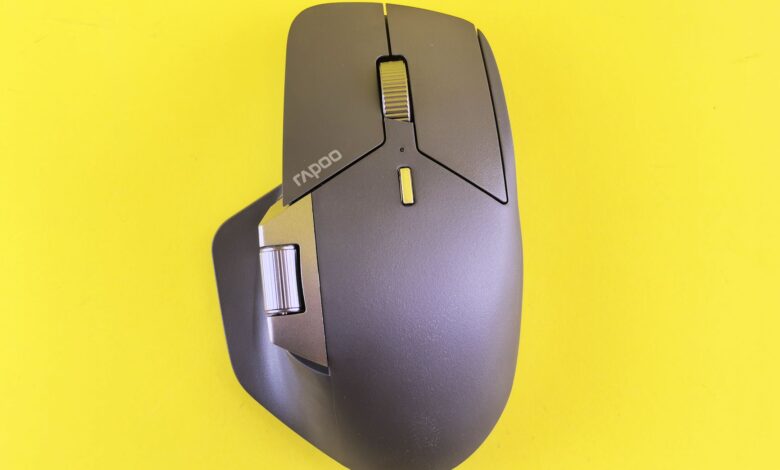
When a mouse is labeled as “ambidextrous,” it means that it’s shaped equally for both left- and right-handed users, but it doesn’t guarantee that users will have the same number or function of buttons on each side. Many mice labeled as ambidextrous have a mirror image of the thumb button on the left side. So when a left-handed person picks up the mouse, they will see the shape of the shell, but they will not see the same buttons. When reviewing the shape of mouse, independent testing labs separate ambidextrous mice into two categories: right handed and left handed. If you review the product photos on a manufacturer’s website, you should see the difference in the shape if you know what you are looking for.
Also, the question of shape versus fit is different from the question of whether or not the mouse is comfortable to use. A mirror image of a mouse’s right-hand cradle removes the right-hand cradle from the mouse shape, and therefore, changes the feel of that mouse for all users. In addition, the second layer of functionality — how your operating system and your mouse’s software use these buttons — determines if you will have access to the extras you paid for. Each of these checks is small, but each occurs at a specific point, and therefore, it is important to understand where to look when reviewing your purchase of a new mouse.
What Actually Makes a Gaming Mouse Ambidextrous
Two things must be true of a physical object such as a shell. It has to be symmetrical on both sides with an imaginary line running down the center of the shell. One side must not have a thumb scoop and the opposite side must not have a flared palm rest. Furthermore, the side buttons must be located where a thumb can reach them from either side. If this is not the case, the mouse has an asymmetrical shape that allows only one hand to control the buttons.
Corsair has taken a more straightforward approach. Corsair’s own M75 explainer states that approximately 10% of the world’s population is left-handed and remains underrepresented in peripheral designs. The closest a left-handed person can get to a left-handed product is a “symmetrical mouse but nearly all actual functionality is still designed for right-handed users.”
Corsair describes its solution as mechanical. The M75 has “side button placement that is bilaterally symmetrical so you have side buttons on both sides.” As an added convenience, the M75 ships with extra magnetic side buttons that can be switched in or out of the mouse. Logitech has approached the problem in a similar fashion, marketing its PRO 2 LIGHTSPEED as “fully ambidextrous – with a symmetrical shape and interchangeable magnetic buttons to adapt to additional grips and styles.” The design in both cases utilizes the same principle: a magnet and contact located behind a removable cover; the switch beneath is intact and the cover determines whether the switch will be accessible to the user or blanked off.
That gives you three classes, and almost every mouse you will look at falls into one of them.
| Design class | What the shell does | Where the side buttons sit | Who it actually serves |
|---|---|---|---|
| True ambidextrous | Mirrors left to right | Both sides, or swappable between sides | Either hand, with full controls |
| Symmetrical shell | Mirrors left to right | Left side only | Right hand fully; left hand loses its thumb buttons |
| Dedicated left-handed | Contoured for the left hand only | Right side, under the left thumb | Left hand only |
While specifications like sensor model type, maximum (ceiling) DPI, and polling rate are very important specifications in other areas, they don’t indicate the side of the mouse on which the hand will be able to grip it. Just because a mouse has higher DPI doesn’t mean something will have a right-mouse button.
How to Tell a Real Ambidextrous Mouse From a Symmetrical Shell
The least expensive signal is the one you can examine before spending any money: you just need to count the side buttons and know which side they are placed. RTINGS, which purchases and tests its own devices, has a different interpretation of this, as they both provide a name for the methodology used in their shape test methodology. A symmetrical mouse with a side button only on one side, according to RTINGS, is classified as “Shape Only.” On the other hand, if a mouse is symmetrical and contains at least one button on each side, it receives the designation of “True Ambidextrous.”
RTINGS also indicates that the designation of “Left-Handed Friendly” is only a shape assessment, which “does not consider other features such as button position on the mouse”. Therefore, the “Left-Handed Friendly” designation from a laboratory does not come with a guarantee that it contains buttons.
When comparing a product’s marketing to its hardware, the price disparity and lack of accountability can be overwhelming. The Razer Viper V3 Pro has been marketed as an ambidextrous mouse, with at least one of the top purchasing guides labeling it as “True Ambidextrous with Dual Side Buttons” on each side of the mouse, which is incorrect.
In the RTINGS review for the Viper V3 Pro, you will find that the ambidextrous field is termed as ‘shape only’ and customers of Best Buy answering the Viper V3 Pro Questions & Answers have also put it in similar terms; that is, that the mouse is technically ambidextrous because of its shape, but its side buttons are only available on the left side. One customer writes, “It does not share the same design of the previous models where you had ambidextrous side buttons and a symmetrical design”. The spec sheet could never be accused of being incorrect; the issue lay in not having answered the question.
So read the listing in this order:
- Count the buttons in the photo, not in the spec line. A “6-button” mouse usually means left click, right click, wheel click, two thumb buttons, and a DPI button — five of those have nothing to do with handedness. What matters is whether two of them appear on the right flank.
- Look for a right-side photo. Listings show the left profile by default because that is where the buttons are. A missing right-side image is a soft signal; a right-side image with a smooth blank flank is a definite one.
- Check whether the buttons are removable or covered. Magnetic side buttons plus blank covers in the box means the switches exist on both sides and you choose which side is live. That is a different product from a shell with nothing underneath the right flank.
According to a hands-on review of the Corsair M75 Wireless, there is one drawback to swappable designs: GamesRadar tested and found that only two of the four side buttons will work together at any one time, and that the swapping-in of flat plates, which sit “fairly flush against the side” means there’s less room for the short button on either end to fully extend, causing it to be a disadvantage for the user. It is important to understand that swappable plate design does not allow the user the ability to press all four side buttons at the same time; therefore, there’s nothing in the listing to indicate this.
Does the Shape Fit Your Hand? Grip Style and Hand Size
When you put the buttons on the correct side of the mouse, it helps usability; however, comfort is not addressed and does solve comfort in other ways. The mirrored (symmetrical) shell gets it symmetry because of the removal of the right hand palm shelf vs adding the left hand palm shelf; this is why symmetrical mice tend to favour claw and fingertip grips and feel unsupported to palm gripping users of either hand.
Your hand is the only constant in your decision; therefore, you should start by taking a measurement. According to Voltcave’s hand measuring guide, you measure from the tip of your tallest finger (middle finger) to your wrist for length and measure across the middle of your palm (including your thumb) for width.
After you measure your hand, it will lead to what is called the “60% Rule” (as referenced by Rocket Jump Ninja); this rule will help you to aim towards a mouse around 60% of your hand’s measurements for length and width. Keep in mind that this is only a starting point; the same source states that it is “not foolproof” because everybody has different preferences regarding types and shapes of mice. However, when going off of the 60% Rule when purchasing a mouse without being able to try it first, this is a “good starting point.”
Grip style then loosens or tightens that target:
- Palm grip — stay closest to the heuristic. Your hand rests on the shell, so a mouse that is too short leaves your palm floating, and a symmetric shell already gives you less to rest on than an ergonomic one.
- Claw and fingertip grips — more room to deviate in either direction, because fewer parts of your hand touch the mouse at all.
- Either grip, either hand — the reach test matters more than the number.
The reach test can be done in stores and on friends’ desks with Logitech’s “Mouse Fit” guide. According to Logitech, your thumb should have “easy, natural access” to all of the side buttons on the mouse and if you have to “stretch” your fingers or otherwise have trouble reaching them, this would suggest the mouse is too big for you. A true-ambi (ambidextrous) mouse will require that a left-handed user run this reach test on the right-hand side instead of the left, and in some cases, the distance of reach from the right side of the mouse may differ from that of the left side as many people do not have equal distances between their thumbs and ring fingers.
Just looking at pictures won’t help you find a good mouse. A customer on one of Corsair’s forums stated that they “looked a lot bigger” on the product page than in reality, while a separate customer who had much larger hands found the same mouse to be very comfortable. Both of these customers were correct. Scale is lost with photographs, which is why there are two reasons for using measurable size and returning products.
What Left-Handed Gamers Really Get to Choose From
The choice set is small but it is not empty, and it splits three ways.
- True ambidextrous mice with both-side or swappable buttons. This is the largest group and the one with real availability. Pulsar’s X2A gaming mouse is a clean example: the manufacturer describes it as “Ambidextrous for both left and right hand,” lists a symmetrical shape, and includes four side-button covers with detachable magnetic buttons, at a listed 57 g (±1 g) and 120.4 × 63 × 38 mm. Logitech’s PRO 2 LIGHTSPEED sits in the same category by the maker’s own description.
- Dedicated left-handed ergonomic mice. These are contoured for the left hand and put the buttons under the left thumb. Pulsar’s X3 LHD gaming mouse is explicitly a “Hybrid Ergonomic – Left hand” design at a listed 55 g (±1 g) and 124.7 × 69.5 × 43.1 mm. Razer still lists a Naga Left-Handed Edition in its current US mouse line-up as its left-handed MMO option.
- Adapting a right-handed or shell-only mouse. Many left-handed players do this and report it works, especially in games where the thumb buttons aren’t load-bearing.
In order to make the best decision on which model to purchase, you must ensure that you can buy it! A lot of times, availability will be a barrier to purchasing something you love. For this reason, it is worthwhile to check on availability before committing to a model. According to the date of your search (September 18, 2026), Pulsar’s official global store did not have either the X3 LHD or the X2A available for purchase — both were listed as sold out. When checking this store for prices on these dedicated left-hand models, we could not verify any of the prices, so we recommend that you check the stores of Pulsar and Razer to confirm current pricing and stock levels. These products are made in limited numbers and may only be available in specific regions.
The frustration and disappointment that you have encountered in your search for a left-handed mouse have already been documented and discussed by many others. In fact, according to the original poster in the r/razer left-handed mouse thread, their models “look ambidextrous from the outside” but are not ambidextrous at all, as they have removed the side buttons from where their thumbs would naturally sit. They also pointed out that the left-handed Naga still only has the old wired version and therefore doesn’t offer any upgraded features.
A commenter on this thread also added: “if you cannot swap hands and have identical functionality, then it is not symmetry. Therefore, it’s not ambidextrous.” The original poster of the thread went on to provide a realistic solution — they ordered a Pulsar X3 LHD and used a second right-handed mouse when they wanted to play an MMO. Thus, a realistic option for left-handed users is actually using two mice rather than one perfect mouse.
It’s not a glamorous reason why the catalog is so small. Left-handed users who have access to the GCS forums state that many of them are using their mouse on the right side (right-handed), despite being left-handed. Most of them learned to use a mouse the way that it was set up on the desktop at the time of learning and therefore continue using a right-handed mouse today. The number of people who may want or need to use a left-handed shell is much less than the total population of left-handed people.
Making the Buttons Match Your Hand: Software and Button Mapping
Different configurations influence “dominant hand”; one does not mean the other, and are located in different places.
The first is an operating system setting that allows you to swap the primary mouse buttons, thus switching which button (i.e., right or left) makes a left-click when pressed. Microsoft documents the path directly:
- On Windows 11, open Start > Settings > Bluetooth & devices > Mouse, then use the drop-down next to Primary mouse button to select Left or Right.
- On Windows 10, the same control lives at Start > Settings > Devices > Mouse, under Select your primary button.
- Confirm it took effect before you rebind anything else — Microsoft’s mouse settings page covers both versions and the related pointer and scroll options on the same screen.
The second element is the mapping of the side buttons within the manufacturer’s unique configuration software (G HUB, Synapse, iCUE, etc).
This is where different models behave differently, and customers are taken aback. On certain mice, you must switch the entire device to a “full left-handed” mode to make the buttons on the opposite side of the device functional, which dramatically changes the primary clicking function. This means you cannot have a mouse that has right-side buttons functional with an original clicking layout. Other mouse models will allow you to keep the buttons functionally alive under a cover, but they are much harder to press. Both of these variations are not mentioned on the product box; they are both product-specific and are due to software and firmware management within each mouse.
There are two implications. One, find out if the mouse has onboard memory or not — if it does, the profile you create can be transferred over to a different computer without installing any software. If it doesn’t, you must keep the configuration software running for your left-handed configuration to work.
Secondly, the OS-level swap does not work consistently: A poster (who plays left-handed) in the community thread notes that “some games do not completely use the reverse button layout, which can cause a lot of difficulty when enabling that option in your OS or driver.” If this is the case, the in-game keybindings will be the way to fix the issue; the window setting will have no effect. Another user on the same thread needed to use a separate mapping application before their extra buttons would function in any games whatsoever.
Before You Buy: The Left-Hand vs. Right-Hand Fit Checklist
Run these five checks against the actual listing you are looking at. The steps are the same for both hands; what changes is which answer counts as a pass.
| Check | Right-handed buyer confirms | Left-handed buyer confirms instead |
|---|---|---|
| Side buttons | Two reachable buttons on the left flank | Buttons on the right flank, or swappable covers that move them there |
| Right-flank photo | Not decisive | A right-side product image showing real buttons, not a blank panel |
| Size vs. your hand | Length near 60% of hand length as a starting point | Same target, plus a right-flank thumb-reach check |
| Software layer | Standard mapping in the maker’s config tool | Whether off-hand buttons need a full left-handed mode, and whether that also swaps primary clicks |
| Return window | Useful | Essential — the fit test only happens after the box is open |
Some things to keep in mind when using them. For the size measurement, we will want to use the “wrist to fingertip” measurement you took from earlier and then compare it to the manufacturer’s published size for the exact SKU. Do not compare it to what has been posted by a retailer. Corsair lists the M75 and M75 WIRELESS dimensions as 128mm x 65mm x 42mm with the wired model being 74g and wireless model being 89g; as the listings are copied around the specs can become inaccurate.
Even with the weight of the mouse being given weight is still more important than what most listicles say for a left-handed buyer, as one reviewer of the mouse put it ” Ambidextrous mice typically weigh more than comparable right-handed lightweight mice because of the added two buttons and switches.” If you want a true lightweight wireless gaming mouse, then you do have to sacrifice a few grams for the symmetrical design. This is a fair trade-off.
Finally name the policy before purchase instead of after. In Logitech’s own US store they have listed the PRO 2 LIGHTSPEED for $149.99 new Direct from Logitech with no shipping cost and free returns within 30 days checked on September 18, 2026 with no promotions displayed at that time.
Retailer and manufacturer warranties are different. A mouse purchased from a marketplace seller may have neither warranty, so make sure you verify the applicable policy for the specific seller’s page you are purchasing from. If your primary consideration is budget rather than which hand you use, you will need to look at the Budget Wireless Gaming Mice Guide to understand the trade-offs for that situation on more than this page only.
The Hand-Fit Decision
An “ambidextrous” designation indicates a shell with mirror symmetry; however, ambidexterity is determined by the location of side buttons on the mouse. To make sure you get a true ambidextrous mouse, it would be best to find the actual SKU from the manufacturer’s web site, look at a photo from the manufacturer’s site that shows the mouse from the right side, and confirm the location and size of side buttons as they are shown on that website; do not depend on what you see on a retailer’s web site or in the retailer’s description. RTINGS’ mouse results table has a chart of all mouse results that have been tested — refer to that page for an additional resource to verify your findings. If you follow that procedure, the worst-case scenario is that you end up with a mouse that feels slightly uncomfortable; if you do not do this procedure, you will find yourself paying for a mouse that is marketed for use by a right-handed person only.
Frequently Asked Questions
Will swapping my primary mouse button in Windows work in every game?
There are some games that can read raw button input and will disregard the reversed button setting in your operating system, which means it will work in your operating system but not inside the game. If this occurs in a game, you will need to rebind the buttons using the game’s own control settings.
Is a “left-handed friendly” rating the same as having buttons on both sides?
The Left-Handed Friendly rating issued by RTINGS is determined on shape alone; however, button layout placement isn’t accounted for. The button layout will be referenced separately from the ambidexterity result, so when choosing a product, it’s important to consider both ratings!
Does my old mouse software still work now that Windows 10 support has ended?
As of October 14, 2025, Microsoft has ceased to provide free updates, technical support, or security updates for Windows 10. Peripheral software continues to run on Windows 10; however, manufacturers will gradually phase out support for older versions of the OS, so you should confirm that your current system meets the manufacturer’s requirements before counting on these products.
