
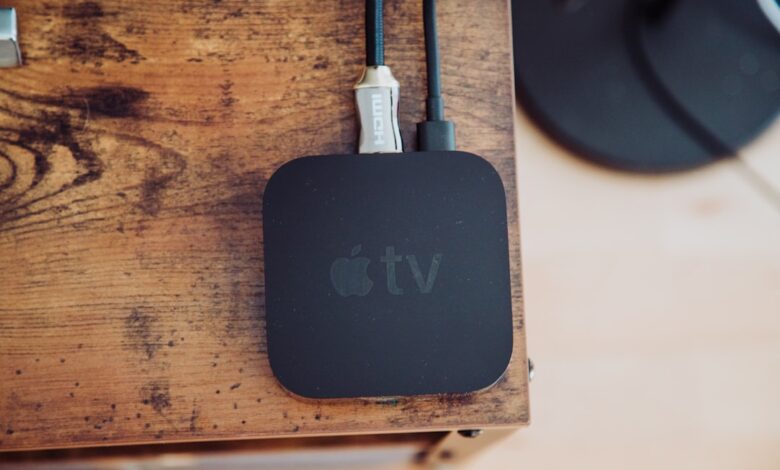
A streaming stick that opens apps instantly out of the box and then stutters an hour into a movie is not failing randomly. It is thermal throttling: the tiny processor inside is overheating in a sealed plastic shell with no heatsink, so it deliberately slows itself down to avoid damage. The fix is not a faster stick, it is one built with real airflow and a properly rated power adapter.
Skin temperature after sustained use, the wall adapter’s rated output, and how quickly the interface responds after an hour of 4K HDR playback are what separate a stick that stays fast from one that crawls. Amazon Fire TV Stick 4K, Roku Express 4K+, and Onn 4K Streaming Box handle this differently, and the shape of the device — stick versus box — matters more than the spec sheet suggests.
Why a $30 streaming stick slows down after an hour
Every streaming device has a small system-on-chip, or SoC, that decodes video and runs the interface. Like any processor, it produces heat proportional to how hard it’s working — and 4K HDR decoding for an hour straight is sustained, heavy work, not a quick burst. Manufacturers set a thermal design power, or TDP, and a junction temperature limit for the chip.
When the chip approaches that limit, the firmware lowers its clock speed to cool down. That’s thermal throttling, and it’s a deliberate safety behavior, not a defect.
The practical result is an interface that felt instant when you unboxed the device and feels sluggish an hour into a show: menus lag, the home screen takes longer to redraw, and playback can stutter briefly during scene changes. Running a 4K HDR title for a full hour and timing how long the home screen takes to open afterward, compared to a fresh cold start, is a simple way to see this happen on your own device.
Three-stage timeline showing a streaming stick’s chip temperature climbing from cold start to throttled state over about an hour of sustained 4K HDR playback
What actually happens inside a tiny plastic enclosure with no heatsink
A streaming stick’s entire body is often smaller than a USB flash drive stack, with no fan, no metal heatsink, and no dedicated vent path — just a plastic shell wrapped directly around the board. Heat has nowhere to go except to slowly radiate through the plastic itself, which is a poor conductor compared to metal. Box-shaped streaming devices like Onn’s 4K Streaming Box have more internal volume and often a vented enclosure, which gives heat more surface area and airflow to escape through.
Placement makes this worse in practice. A stick plugged directly into the HDMI port on the back of a TV sits in a small dead-air pocket behind the screen, often pressed against a wall-mounted TV’s rear panel, which traps the little heat the shell does manage to shed. Using a short HDMI extender cable to hang the stick in open air behind the TV, rather than jammed into the port, is one of the simplest fixes for a stick that runs hot.
Why the power adapter matters as much as the vents
Streaming sticks typically ship rated for either 5V/1A or 5V/1.8A depending on the model and region. An underpowered adapter, or plugging the stick into a TV’s USB port instead of the wall adapter it shipped with, can force the chip to work harder to maintain stable voltage, which generates more heat and can trigger throttling sooner than the same stick on its proper wall adapter would.
In the settings menu, look for: a device or about section that shows current performance or storage state, and check the fine print on your power adapter for its voltage and amperage rating against what the manufacturer specifies for that exact model. A TV’s rear USB port is convenient but is usually not rated to match the stick’s dedicated wall adapter.
Side-by-side boxes comparing a dedicated wall adapter to a TV’s rear USB port as the power source for a streaming stick
Fire TV Stick 4K vs Roku Express 4K+ vs Onn 4K Streaming Box: which stays fast
This comparison is based on each manufacturer’s published hardware specifications and physical form factor, not a claim of lab-testing every retail unit. Form factor and enclosure design are the biggest predictors of sustained thermal behavior across this category.
| Device | Form factor | Rated power | Thermal design note |
|---|---|---|---|
| Amazon Fire TV Stick 4K | Stick, plugs directly into HDMI | 5V/1A typical | Compact sealed shell; benefits most from an HDMI extender for airflow |
| Roku Express 4K+ | Small box with short HDMI cable | 5V/1A typical | Separated from the TV by the cable, which helps avoid the dead-air pocket behind the screen |
| Onn 4K Streaming Box | Larger vented box | 5V/1.8A typical | More internal volume and vent surface area; generally the most thermally forgiving shape in this price tier |
Fire TV Stick 4K pros: smallest footprint, hides neatly, wide app support. Cons: stick shape is the most exposed to the dead-air pocket behind a wall-mounted TV — a genuine reason to pair it with an HDMI extender. Roku Express 4K+ pros: cable-separated box keeps it off the TV’s rear panel by default, simple interface. Cons: still a compact sealed shell with no active cooling.
Onn 4K Streaming Box pros: most vent surface area and internal volume in this group, and the higher-rated 5V/1.8A adapter gives it more headroom under sustained load. Cons: bulkier, needs more space near the TV, and a longer HDMI cable if your ports are tight to reach.
The overheating inspection checklist before you buy
Run through this before checkout, whether you’re comparing boxes in a store or reading spec pages online.
- Vent design: does the shell have visible vent slots, or is it a fully sealed plastic case with no airflow path at all?
- Power adapter rating: does the listing specify 5V/1A or 5V/1.8A, and does the box include a matched wall adapter rather than assuming you’ll use a spare one?
- Placement fit: will the device sit directly against the TV’s rear panel, or is there room for a short HDMI extender to hang it in open air?
- Form factor: is it a slim stick or a boxier shape with more internal volume for heat to spread across?
This checklist is a practical evaluation tool created for this guide based on the mechanisms described above, not a published industry standard. Use it as a five-minute check before you buy, and again after your first hour of real use once you get the device home.
How long budget streaming sticks actually last
Certifications on these devices confirm safety and radio compliance, not thermal performance under sustained load. IEC 62368-1:2023 is the audio/video safety standard that governs how the device and its power supply handle heat without becoming a fire or shock hazard under normal and single-fault conditions. It does not measure or limit ordinary thermal throttling. UL Listed and FCC Part 15 Subpart B compliance confirm the device passed electrical safety and radio-emissions testing, which is a baseline trust signal, not a performance guarantee.
A budget streaming stick used for a few hours a day typically holds up for several years of normal use once you’ve addressed placement and power. Thermal throttling itself does not damage the device — it protects it — so a stick that slows down after an hour is not shortening its own lifespan by doing so; it is simply telling you the enclosure and adapter are the bottleneck for sustained sessions.
Before You Buy
The spec sheet won’t tell you which stick stays fast, because throttling comes down to enclosure shape, vent design, and adapter rating more than raw processor speed. A boxier device with visible vents and a properly rated adapter, kept off the TV’s rear panel with an HDMI extender if needed, is the practical way to avoid the hour-in slowdown — regardless of which brand’s logo is on the front.
Frequently Asked Questions
Why does my Fire TV Stick slow down after watching for a while?
The processor is thermal throttling inside its sealed plastic shell with no heatsink. After roughly 45 to 60 minutes of sustained 4K HDR playback, it nears its temperature limit and firmware lowers clock speed, causing menu lag and occasional stutter.
Does using an HDMI extender actually help with overheating?
Yes. It moves the stick out of the small dead-air pocket directly behind the TV, especially on wall-mounted sets, giving the shell more open air around it to shed heat instead of trapping it against the TV’s rear panel.
Should I use the TV’s USB port to power my streaming stick?
Not ideally. TV USB ports are often rated for less stable current than the stick’s dedicated wall adapter, which can add heat under sustained load. Use the wall adapter that shipped with the device whenever possible.
Which stays cooler longer: a stick or a box-shaped streaming device?
Box-shaped devices like Onn’s 4K Streaming Box generally run cooler under sustained load because they have more internal volume, vent surface area, and often a higher-rated power adapter than slim stick-style devices.
