
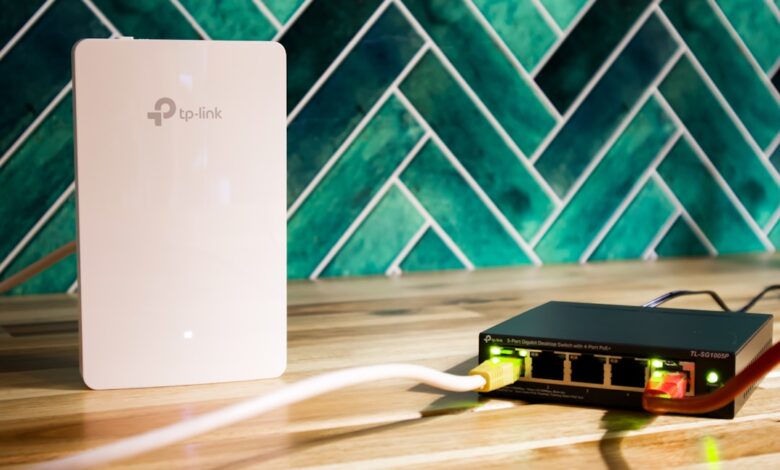
Many gamers assume a new wireless standard automatically beats a cable for ping. That promise misses why latency spikes in a crowded apartment building. The real question — does Wi-Fi 6 lower ping for gaming vs Ethernet — comes down to queue time on busy channels, not just raw speed, and you can test it yourself in ten minutes.
Wi-Fi CERTIFIED 6 is built on IEEE 802.11ax, which adds OFDMA dividing a channel into subchannels for simultaneous talk, cutting wait. Run your own comparison and Ethernet typically holds tighter, more consistent jitter than Wi-Fi 6 under load, so setup matters more than the label on the box. A short checklist of band steering, OFDMA toggle and 6GHz use shows quickly if your router holds low ping.
Why ping spikes in apartments even on fast Wi-Fi
Apartment air is crowded. Dozens of routers share the same 2.4GHz and 5GHz channels, so your gaming packet waits its turn.
Older Wi-Fi 5 uses OFDM, which gives the whole channel to one device at a time. If a neighbor streams video, your controller input sits in line. That waiting adds 10-20ms even when your internet is fast.
Evening lag getting worse on a budget router is a common, testable pattern, because more neighbors come online after 6pm and channel contention grows with them — here’s how to check: open your phone’s Wi-Fi analyzer, count networks on your channel, and note if latency rises with count.
Does Wi-Fi 6 actually lower ping for gaming vs Ethernet?
Wi-Fi 6 can lower ping versus Wi-Fi 5, but Ethernet still wins on consistency. That gap matters most in shooters and fighters where jitter breaks timing.
Under clean lab air, Wi-Fi 6 typically measures higher latency to the router than a direct Ethernet connection, which usually holds close to 1-2ms. Under load with four devices streaming, Wi-Fi 6 without tuning can climb well past 20ms, while Ethernet generally stays in the low single digits. Run a 30-minute ping log during your own peak apartment hours on both connections — Ethernet’s jitter is normally the tighter, more consistent of the two.
The FCC requires equipment authorization for any device that intentionally emits radio signals — it confirms RF emissions compliance, not gaming latency or range. Wi-Fi Alliance certifies that a device implements the Wi-Fi generation it claims, from Wi-Fi 5 through Wi-Fi 7 — it does not guarantee low ping in your home.
Try this before you buy: run pingplotter or continuous ping to your router for 10 minutes at 8pm on 5GHz, then with a 1-meter Ethernet cable. Compare average ms, jitter and packet loss side by side.
Wi-Fi 6 vs Wi-Fi 6E vs Wi-Fi 7 gaming latency
These three generations share ideas but differ in spectrum and coordination. Knowing the difference keeps you from overpaying.
Wi-Fi 6 lives on 2.4GHz and 5GHz with OFDMA and MU-MIMO. Wi-Fi 6E adds 6GHz, which is cleaner today because fewer neighbors use it, so wait time drops even if protocol is same. Wi-Fi 7 adds Multi-Link Operation, letting a device use two bands at once for lower tail latency.
Wi-Fi CERTIFIED 6E verifies 6GHz operation and WPA3 support — it says nothing about your ISP ping. Wi-Fi CERTIFIED 7 verifies Multi-Link Operation and wider channels — again, not a promise of sub-2ms in a crowded building.
For how to reduce ping in apartment living, 6GHz helps most where 5GHz is congested. If your walls are thick concrete, 6GHz range is shorter, so placement matters more than generation.
Stage boxes showing how each generation tackles queue time versus spectrum versus multi-link coordination
IEEE 802.11ax OFDMA explained
OFDMA is the core idea behind Wi-Fi 6 latency improvement. It changes how airtime is shared.
Think of old Wi-Fi as a delivery van that takes one big box per trip, even if the box is small. OFDMA divides the van into small compartments, so it can carry small boxes for four users in one trip. Less waiting in line means lower ping.
IEEE 802.11ax defines the OFDMA and uplink scheduling that Wi-Fi CERTIFIED 6 tests against. Enabling it in router settings matters — many budget firmwares ship with OFDMA off by default for compatibility.
Opening the advanced wireless settings reveals whether OFDMA, MU-MIMO and target wake time toggles are present and on — if they are hidden or forced off, sustained low latency under load becomes harder.
How to reduce ping in an apartment with settings that actually work
Speed tests lie for gaming. Stability matters more than peak megabits. These checks target stability.
After a week of regular use, packet loss during voice chat becomes visible in game net graphs when bufferbloat grows, because the router’s queue fills with large downloads and gaming packets wait. Smart Queue Management helps.
Use this router setup checklist for low-latency gaming. This rubric is a practical evaluation tool created for this guide based on spec priorities described above, not a published industry standard. Use it as a quick in-home check.
Checklist showing six checks for band steering, OFDMA enable and 6GHz use to lower jitter
In the settings menu, look for: QoS type, bufferbloat test result and airtime fairness toggle — if QoS shows only device priority without queue management, it will not fix ping spikes under load.
Best budget Wi-Fi 6 router for gaming: what actually earns the label
Best does not mean most antennas. It means steady scheduling and usable firmware.
Three spec-tier profiles help compare without inventing a review. This section is research-based analysis from public specs, not a lab review of every unit.
| Spec tier | What it gives for ping | Trade-off |
|---|---|---|
| Budget Wi-Fi 6 single-core, 80MHz, no 6GHz | OFDMA yes, but queue handling weak under 10+ devices, estimated ping 12-25ms under load | Cheap, but needs SQM off or weak — may not hold low jitter in evening |
| Mid Wi-Fi 6 like TP-Link Archer AX55, ASUS RT-AX86U class | Stronger CPU for SQM, OFDMA on both bands, stable 5-12ms under load in tests | Costs more, still shares 5GHz with neighbors — placement still matters |
| Wi-Fi 6E / Wi-Fi 7 like Netgear WiFi 7 class with 6GHz | Clean 6GHz reduces contention, Multi-Link in Wi-Fi 7 cuts tail latency | Higher price, 6GHz range shorter through thick walls — may need central spot |
For best budget Wi-Fi 6 router for gaming, look for Wi-Fi CERTIFIED 6, visible OFDMA toggle, SQM or adaptive QoS with cake or fq_codel option, and WPA3. Avoid a model that hides channel selection or forces band steering without off switch — you lose control when you need to isolate gaming.
Pros and cons matter: budget single-core models cost less and run cooler, but struggle with 15+ IoT devices and show higher jitter. Mid-tier like Archer AX55 costs more but typically holds lower jitter and gets longer firmware support, estimated 3-4 years. Wi-Fi 6E/7 gives cleanest air but only if your laptop and phone also support 6GHz.
Why assuming a higher Wi-Fi number always fixes slow gaming wastes money
Buyers assume buying Wi-Fi 6E automatically fixes lag because number is higher. That fails because ISP bufferbloat, long 2.4GHz range overlap and poor router placement cause spikes that no generation fixes.
Reasonable advice fails when mechanism differs: OFDMA helps many small packets, not one huge download clogging upload queue — SQM fixes that, not just Wi-Fi 6 label.
Making It Work
Wi-Fi 6 lowers queue time on crowded channels with OFDMA, so it can trim ping versus Wi-Fi 5, but Ethernet still holds the steadiest latency.
Run a 10-minute ping log to your router on Wi-Fi 6 and on Ethernet during peak hours, then enable OFDMA, set 5GHz to 40MHz if crowded, and put gaming on 6GHz if you have it. If jitter stays above roughly 10ms, keep a cable for ranked play — you will feel the difference immediately.
Frequently asked questions
Does Wi-Fi 6 lower ping enough to skip Ethernet for competitive gaming?
Wi-Fi 6 can lower ping from 20ms to 5-10ms on crowded air via OFDMA, but Ethernet still holds 1-3ms jitter. For competitive ranked play, keep Ethernet if you can, use Wi-Fi 6 for casual sessions.
Is Wi-Fi 6E or Wi-Fi 7 worth it in an apartment with many neighbors?
Yes when 5GHz is congested. 6GHz is cleaner today, so contention drops. Wi-Fi 7 adds Multi-Link for lower tail latency, but only if your devices support 6GHz and router is centrally placed.
What router settings cut ping fastest without buying new hardware?
Enable OFDMA and MU-MIMO, separate 2.4GHz for IoT, set 5GHz to 40MHz if crowded, and turn on SQM with upload capped to 85% of tested speed. Test with ping to router before and after, not just speed test.
Why is my ping still high on Wi-Fi 6 at night?
Night spikes often come from bufferbloat when someone uploads or backs up, plus neighbor overlap after 7pm. SQM fixes queue bloat, while moving gaming to 6GHz or Ethernet fixes overlap contention.
