
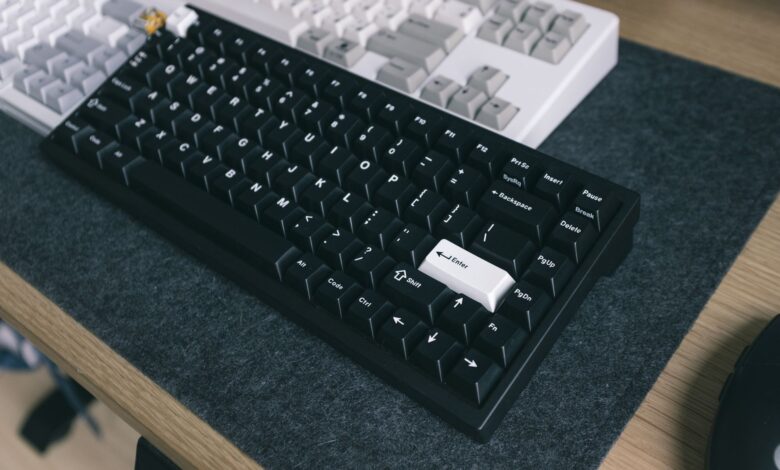
When you say “75 percent” in terms of keyboard size, you are not getting a measurement of anything since no standards body really defines what keyboard size percentages mean. The only useful thing that this designation gives you is an idea of what keys will likely be present on a keyboard (the top row of shortcut keys, the arrow keys, and none of the numberpad) — it does not give you any information about how much desktop space it takes up. For instance, Keychron uses this same label for both their normal keyboard, split keyboard, and angled keyboard.
This is far more significant than the typical size-chart comparison makes it seem. The truth is that when you purchase a 75% keyboard, you are making a decision to trade off desk width for access to essentially “automatic” keys — the keys that you use frequently enough that you do not even have to think about reaching for them. While the savings compared to the next higher percentage category can be substantial, they tend to be less than what most people expect and vary based upon the keyboard model, not necessarily the same manufacturer’s label. In fact, there could be greater differences between two keyboards that have the same percentage designation than between two keyboards that have different percentage designations.
What 75% Actually Means
A 75% keyboard retains the function row and arrow keys, but removes the number pad and compresses navigation keys into a narrow column to the right of the keyboard. The term “75%” is used as a descriptor of the keyboard, not as an official size class, which is why there may be differing key counts for two keyboards labeled with the same name.
The compression of navigation keys is what is lost on a 75% layout. On both tenkeyless keyboards and full-sized keyboards, navigation keys such as Home, End, Page Up, Page Down, Insert and Delete are located in a distinct area with considerable space around them. However, in a 75% layout, navigation keys are grouped into one vertical column next to Enter and Backspace, while the function keys are brought closer to the number row due to the lack of space between these keys. This close proximity of keys results in the keyboard being narrow, and makes typing on it feel like a new experience for the first week.
As to the number of keys on a 75% keyboard, there are some inconsistencies in the reported key counts. For example, Corsair has a product page for the K65 Plus Wireless, which states that this is a 75% keyboard, while the product is listed by retailers and reviewers as having either 81 keys or 84 keys, depending on whether or not the rotary and decorative keys are included in the key counts. These inconsistencies occur because the product is the same, but the way the keys are counted varies from source to source.
Keychron’s 75% keyboard collection is actually located in between both Keychron’s 80% keyboards and their 65% keyboards, so if you shop for or review TKL boards, you see that they are labeled as 80% in Keychron’s 75% collection. A size guide like RTINGS’ keyboard size guide offers more commonly used terminology than Keychron’s. There are different ways to label these sizes and neither the way that RTINGS or Keychron has used is inaccurate; there is no governing body that defines how to write those sizes. The community tends to come to a consensus over time in forums such as “what the percentages mean.”
75% vs TKL vs Full-Size: The Footprint Math
When comparing the footprints of a 75% board and a tenkeyless (TKL) board, you will find 37 mm difference in width, while a full-size board and 75% board have a width separation of about 118 mm. Comparing only the same brand and series is the fairest way to do a comparison because the case bezels and mount styles will alter the measurements as much as the key selection will.
Across Keychron’s Q series, the 75% version, Keychron Q1 Max, measured 327.5 mm wide, the 80%/TKL version, Q3, measured 365 mm wide, and the full-size version, Q6 Max, measured 446 mm wide. Going from full-size to 75% opens up about 4.7 inches of usable space on your desk. Going from TKL to 75% frees up about 1.5 inches.
That 1.5 inch difference is a substantial amount for those who have a very small desk, as it provides roughly one extra sweep of your mouse if using a low sensitivity setting; however, it does not amount to the big difference shown on size charts and is essentially the entire practical improvement of a 75% board compared to a TKL.
Almost no discussions of size between keyboards mention depth, but it does run in the opposite direction as well. The Q1 Max measures 145 mm deep, while the Q3 measures 137 mm deep; this means the 75% keyboard will be approximately 8mm deeper than the tenkeyless keyboard next to it. A compact layout offers width, but front-to-back area is not offered, and for shallow desks or keyboards’ trays it matters for determining if a board is going to fit or not.
It is reasonable and understandable that this offers a good deal of skepticism, as there has been much discussion about whether a 75% keyboard is useful in small-desk building communities. The 75% keyboard usefulness debate is a measured difference is that while there are advantages going from a full-size to a 75%, the difference is slight compared to jumping from TKL to 75%.
Is a 75% Keyboard Good for Gaming?
For players who require the function row on their keyboard, a 75% layout is still an excellent option for gaming, as the F1–F12 keys and arrow keys are still available, while freeing up space for your mouse’s movement. It’s only an inadequate choice if your game uses the number pad for binding actions, or if you rely on the mid-section’s navigation block in the heat of battle.
When determining what is most important to the community, genre is very important to consider. An example of this is anything in the MMO or MOBA genre, where ability bars and target cycling take place on the function keys. The community clearly understands the importance of the function key and where it is located on a layout, as seen in discussions about how important F-keys are for gaming. The 75% keyboard keeps the function key and all other keys in the same location on the board. In low sensitivity shooters, an advantage of the 75% keyboard is the width eliminated on the right side, while in the 60% vs. 75% discussion for gaming, the consensus is always that a 75% is better for players wanting to include arrow keys without a second thought.
The downside is that this layout results in the right-most column being less spaced apart than layouts that have quarter-sized spaces between each column. For example, the Delete, Page Up, and Home keys are immediately next to the Enter and Backspace, meaning that a hasty reach during a game may inadvertently execute the wrong key. With practice, the likelihood of making these errors decreases, but this is something you should expect to happen within the first week of use.
There are no financial barriers for keyboards outside of the $150 range so check out Corsair’s K65 Plus Wireless priced at $159.99; RTINGS’ roundup of 75% keyboards has collected the best-performing 75% Keyboards through their own independent testing and found that they all work great for either casual or competitive gaming. Spec sheets provide little information when trying to choose which 75% Keyboard will suit your needs.
What Actually Determines Keyboard Latency
Polling rate is the frequency with which your keyboard sends information to your computer (not how fast or quickly a keyboard responds to your finger). A 1,000Hz keyboard will send a signal every 1ms, while an 8,000Hz keyboard will send a signal every 0.125ms. Therefore, the advertised number represents the maximum number of times a new signal can be sent out to your computer, not how long it takes for the keyboard to recognize that you have pressed a key.
The above two quantities are not the same; however, they are often confused in marketing materials. For example, Razer has marketed their Huntsman V2 as having an “actual” polling rate of 8000Hz, which is an easily verified measurement of the rate at which Razer reports data to your computer. However, Razer also claims that their Huntsman V2 has a “response time” of 0.1ms, which cannot possibly be true, since a 1,000Hz polling rate includes a maximum of 1ms in delay between when you press the key and when your computer receives the signal.
True latency is comprised of several different elements, including the time taken for you to press the switch, the time taken for your keyboard’s firmware to process the signal, the time between when your computer receives the signal and when it sends a response back, and the type of connection used for communication between the keyboard and computer. For example, the wireless connection of a keyboard generally has a different actual latency than the wired connection of the same keyboard. That is why the best way to measure keyboard latency is using published metrics from protocols that include USB analyzers and follow consistent methodologies. An example of the use of published methodologies to measure and report keyboard latency can be found on RTINGS.com.
The layout does not determine any of these items. A 75% board cannot be faster or slower based on it being 75%. A 75% label simply indicates what switches will be present on that board; the latency of the board will be determined by its switches, firmware, and connection. Considering a compact layout as a feature that enhances performance is incorrect.
Everyday Use: The Numpad Question and Workarounds
Most days, you’ll be fine losing the number pad…but some days (when you enter long columns of numbers) it can be painful!! There are two solutions available: firmware that allows you to map digits to existing keys AND a separate external number pad (the second solution comes with a trap that catches the buyer time and again).
The cleaner solution is the firmware. For example, if your keyboard uses QMK software, you can take advantage of the ability to create “layers” of key mappings. By holding down a key (or by tapping / toggling multiple times), you can switch to its associated layer while still keeping the original keycode intact. So, as long as you have your finger on the key, you will be able to access the number pad on the secondary mapping layer of your keyboard…no separate, external number pad is needed to achieve this (Keychron has a similar solution with their Configurator). Boards running QMK support layer switching keycodes that hold a second mapping while a key is held, toggle it, or tap-toggle it, so a number pad can live under your right hand on a layer without any extra hardware.
This is where the issue arises with the external pad. In a KC21 number pad report documenting the experience of a customer who purchased the KC21 External Number Pad for use with a 75% keyboard layout — the external pad only produced numbers when the “Num Lock” was activated ON. Thus, when the Num Lock was activated, the “embedded” numbers on the main keyboard itself took precedence over the external pad and turned the alphabetic letters (u, i, o, p, j, k, l, m) into numbers on the external pad! So, the keyboards became unusable for typed letters.
The mechanism that underlies this is the reason Num Lock cannot be returned as a defect. Num Lock is a global, operating-system-wide state rather than being a device-by-device setting, and as previously described in a long-running geekhack thread regarding non-independent Num Lock, the pad will send the same key codes, no matter how Num Lock is set, since the OS interprets them accordingly based on one global flag. In 2012, people reported the same problem with an entirely different device when J, K, L, M, U, I, and O would switch to their numeric form.
There are three ways to resolve this problem. Some number pads manage their own Num Lock state locally, by lighting their own indicator and masking each key press, so the host never sees a persistent change. Others are resolved at the level of the keyboard, with boards that can turn off their embedded number layer independently, so that Num Lock no longer takes over the letter keys.
Remapping the keys on the pad using firmware or key-remapping software will also work. The remedy suggested in the initial thread was simply to press Fn first on the keyboard, then Num Lock on the pad. Due to the fact that each OS will behave differently, and the firmware of each device may also differ, it is best to verify against your own two devices, rather than make the assumption that a certain pairing will be compatible.
Why Two 75% Keyboards Aren’t Identical
The keyboards tagged as 75% can range from differing key counts, and physical layouts to differing polling rates. The label is an estimate of what keys the keyboard contains but does not provide enough information for someone to narrow their selection. When looking for a keyboard based only on the label percentage, they may have randomly chosen between several truly distinct products.
The physical layout is the greatest difference, as can be seen from Keychron’s own catalog. Among their 75%, Keychron lists a traditional 75% keyboard, a 75% split keyboard, a 75% angled key column (Alice) keyboard, and a 75% slim keyboard under one collection. Someone could purchase the 75% tag without knowing what the layout looks like and end up needing to learn how to use it as it is not the usual layout.
Key count can also differ when comparing the same keyboard. For example, Corsair’s model is shown with an 81-key and an 84-key option. Also, the connectivity specification could differ depending on which mode it was connected in, with an advertised 8,000 Hz when connected via wire and less when connected wirelessly. The distinction between the two would only be found in the detailed product specification table.
Another hurdle presented by naming disputes and differences among brands is that compact keyboards in the 80 keys range are marketed by some as “75%,” others as “80%,” and others still as “tenkeyless.” These are all terms used to describe the same products by a variety of different retailers, manufacturers, and reviewers. However, you can eliminate this confusion by taking just three steps prior to committing to anything.
First, find the manufacturer’s page for an exact model of a compact keyboard with a corresponding suffix. Manufacturer’s pages provide definitive answers to the name game; the same model can have different software and specifications that all relate back to the same model’s name and suffixes, so it is crucial to refer to the manufacturer’s page.
Next, check out the specification table rather than the marketing copy. In particular, verify the keyboard’s number of keys; its width and depth in millimetres; and its stated polling rate for each connection type. The marketing copy refers to the fastest polling rate, but the specification table refers to the actual rates of all available connections.
Compare the layout graphic of your daily key habits with the picture above. Find the keys Delete, Page Up, Home and right Shift in the image. Then ask yourself if your hands already go to those locations when you use your keyboard. This is where you may find a key that can cause your keyboard to split, or an Alice variant that uses a standard percentage in its display.
The Gaming-versus-Everyday Decision Matrix
Table 1 depicts the Q line from the same manufacturer at three different widths that were first published on September 18, 2026. Therefore, the comparison illustrates the differences in layout only (case design is not relevant for this comparison). The absence of scores indicates that the appropriate answer is entirely dependent upon the particular row that is of interest to you.
| Factor | 75% | TKL / 80% | Full-size / 96% |
|---|---|---|---|
| Width (one brand, one series) | 327.5 mm | 365 mm | 446 mm |
| Desk freed vs full-size | ~118 mm | ~81 mm | none |
| Mouse swing room | Best of the three | Good | Limited |
| Function row | Physical | Physical | Physical |
| Dedicated arrows | Yes | Yes | Yes |
| Navigation keys | Compressed column | Separated block | Separated block |
| Number entry | Layer or external pad | Layer or external pad | Built in |
| Relearning cost | Moderate, first week | Minimal | None |
| Best fit | Small desks, low-sensitivity aiming | Desk space to spare, heavy navigation use | Daily numeric data entry |
To effectively read information from a pad, it is important to view the text structured into rows instead of columns. If you primarily rely on the numeric rows to perform your work, you will find no benefit to saving desk space whatsoever by using a pad that is only 96% layout. However, if mouse room is your main concern, then using a 75% layout pad will give you the superiority in both reading and space advantage; however, you will be sacrificing some of the usability of the pad in exchange for a narrower, more compressed navigation column.
When 75% Makes More Sense
If you want the best of both worlds, a 75% keyboard presents the best option for getting the function keys and arrow keys back while maintaining a mouse-like width. However, if most of your daily tasks revolve around entering numbers, this type of keyboard could be an incorrect choice. Before you purchase your 75% keyboard, go to the manufacturer’s specification page to find the specific model and suffix. After this, check that you have the correct number of keys and the correct width and depth (in millimetres) and the per-mode polling rate. Manufacturers will often provide information about their products in a table format that is more reliable than retailer listings or user reviews. If you do not check the manufacturer’s table and make sure that you have the right keyboard, you may purchase a keyboard that does not fit your needs — a split keyboard or a keyboard that is too deep for your computer tray.
Frequently Asked Questions
Is a 75% keyboard hard to get used to?
Because the function row and arrow keys are still physically present, adjustments are typically minor. The right-hand column is compressed, causing the Delete and Page Up keys to be flush against the Enter key with no space. After about one week, most typists adjust to these new conditions.
What is the difference between a 75% keyboard and a 96% or 1800 layout?
Layouts measuring 75% have eliminated the number pad. In contrast, 96% and 1800 layouts retain it but have eliminated the spacing between clusters. The anticipated number of keys per layout is typically between 96-100, as opposed to the low-to-mid 80s, with a more substantial width for boards using those layouts.
Will a keycap set sold for a full-size keyboard fit a 75%?
Compact layouts will generally have a smaller right Shift and narrower bottom row modifiers than a full size board and since they often sell sets by key count only, many include just the standard sizes of keys and omit the smaller ones. Be sure to compare the key sizes indicated on the board with those included in the kit prior to purchasing.
